<?xml version="1.0" encoding="utf-8"?><feed xmlns="http://www.w3.org/2005/Atom" ><generator uri="https://jekyllrb.com/" version="4.2.2">Jekyll</generator><link href="https://www.lockhacking.com//feed.xml" rel="self" type="application/atom+xml" /><link href="https://www.lockhacking.com//" rel="alternate" type="text/html" /><updated>2022-07-24T14:12:51-04:00</updated><id>https://www.lockhacking.com//feed.xml</id><title type="html">Lock Hacking</title><subtitle>A blog about hacking eletronic locks.</subtitle><author><name>Jason</name></author><entry><title type="html">Runtime Instrumentation with Objection part 1</title><link href="https://www.lockhacking.com//2022/07/24/runtime-instrumentation-1.html" rel="alternate" type="text/html" title="Runtime Instrumentation with Objection part 1" /><published>2022-07-24T14:02:00-04:00</published><updated>2022-07-24T14:02:00-04:00</updated><id>https://www.lockhacking.com//2022/07/24/runtime-instrumentation-1</id><content type="html" xml:base="https://www.lockhacking.com//2022/07/24/runtime-instrumentation-1.html"><![CDATA[<h2 id="introduction">Introduction</h2>
<p><a href="https://github.com/sensepost/objection">Objection</a> is as a runtime mobile exploration framework, works with actual mobile devices and emulators, on both iOS and Android. Objection is built in part on the amazing <a href="https://frida.re/">Frida</a>, and comes with a lot of really nice tools like SSL unpinning and live function modification. The Defcon 27 talk <a href="https://www.youtube.com/watch?v=7LKXSYFrYAM">Meticulously Modern Mobile Manipulations</a> by Leon Jacobs has a bunch of great examples of mobile runtime modification with Objection.</p>

<p>I will demonistrate how to use Objection to turn enable logging on and android application running on a live device. I want to enable the logging so I can understand the communication between my android device and a BLE lock.</p>

<h2 id="setup">Setup</h2>

<p>Objcetion is super powerful but the setup, especially the first time, can be a little daunting. The <a href="https://github.com/sensepost/objection/wiki">Objection Wiki</a> has a bunch of great articles on installation and configuration.</p>

<p>After following the wiki instructions I’ve got:</p>

<ul>
  <li>A patched client APK running on my android device, attached to USB</li>
  <li>Objection REPL running in one terminal</li>
  <li><a href="https://developer.android.com/studio/command-line/logcat"><code class="language-plaintext highlighter-rouge">adb logcat</code></a> running in another</li>
</ul>

<p>After installing the patched APK I fed it to the <a href="https://www.benf.org/other/cfr/">CFR Decompiler</a> to get (heavily obfuscated) Java code.</p>

<h2 id="finding-the-logger">Finding the logger</h2>
<p>Some light poking around in the bluetooth code led me to a class named <code class="language-plaintext highlighter-rouge">LogUtil</code> which is called from lots of interesting code like:</p>

<figure class="highlight"><pre><code class="language-java" data-lang="java"><span class="nc">LogUtil</span><span class="o">.</span><span class="na">d</span><span class="o">(</span><span class="n">var2_3</span><span class="o">.</span><span class="na">append</span><span class="o">(</span><span class="s">"receiver data="</span> <span class="o">+</span> <span class="n">byteArrayToHexString</span><span class="o">(</span><span class="n">var1_1</span><span class="o">),</span> <span class="kc">true</span><span class="o">);</span>
<span class="c1">// ...</span>
<span class="nc">LogUtil</span><span class="o">.</span><span class="na">d</span><span class="o">(</span><span class="n">var2_3</span><span class="o">.</span><span class="na">append</span><span class="o">(</span><span class="s">"mReceivedBufferCount:"</span><span class="o">).</span><span class="na">append</span><span class="o">(</span><span class="nc">BluetoothLeService</span><span class="o">.</span><span class="na">toString</span><span class="o">(),</span> <span class="kc">true</span><span class="o">);</span>
<span class="c1">// .. </span>
<span class="nc">LogUtil</span><span class="o">.</span><span class="na">d</span><span class="o">(</span><span class="n">var2_3</span><span class="o">.</span><span class="na">append</span><span class="o">(</span><span class="s">"dataLen:"</span><span class="o">).</span><span class="na">append</span><span class="o">(</span><span class="n">var4_5</span><span class="o">).</span><span class="na">toString</span><span class="o">(),</span> <span class="kc">true</span><span class="o">);</span></code></pre></figure>

<p>Not all of these lines make sense yet but they are exactly the kind of calls I need if I’m going to perform an analysis on this lock.</p>

<p>The (lightly edited) <code class="language-plaintext highlighter-rouge">LogUtil</code> looks like:</p>

<figure class="highlight"><pre><code class="language-java" data-lang="java"><span class="kd">public</span> <span class="kd">class</span> <span class="nc">LogUtil</span> <span class="o">{</span>
  <span class="kd">private</span> <span class="kd">static</span> <span class="kt">boolean</span> <span class="no">DBG</span> <span class="o">=</span> <span class="kc">false</span><span class="o">;</span>
  <span class="kd">private</span> <span class="kd">static</span> <span class="kd">final</span> <span class="nc">String</span> <span class="n">msg</span> <span class="o">=</span> <span class="s">"%s(L:%d) - %s"</span><span class="o">;</span>

  <span class="kd">public</span> <span class="kd">static</span> <span class="kt">void</span> <span class="nf">d</span><span class="o">(</span><span class="nc">String</span> <span class="n">string2</span><span class="o">)</span> <span class="o">{</span>
    <span class="k">if</span> <span class="o">(</span><span class="no">DBG</span><span class="o">)</span> <span class="o">{</span>
      <span class="nc">Log</span><span class="o">.</span><span class="na">d</span><span class="o">((</span><span class="nc">String</span><span class="o">)</span><span class="n">callerClazzName</span><span class="o">,</span> <span class="o">(</span><span class="nc">String</span><span class="o">)</span><span class="nc">String</span><span class="o">.</span><span class="na">format</span><span class="o">(</span><span class="n">msg</span><span class="o">,</span> <span class="o">...,</span> <span class="n">string2</span> <span class="o">));</span>
    <span class="o">}</span>
  <span class="o">}</span>
<span class="o">}</span></code></pre></figure>

<p>The <code class="language-plaintext highlighter-rouge">d</code> method does some formatting and calls the built-in android logger if <code class="language-plaintext highlighter-rouge">DBG</code> is true. But the value is false by default - so how can I turn on debugging?</p>

<h2 id="eanbling-debug-logging">Eanbling debug logging</h2>
<p><a href="https://frida.re/">Frida</a> is behind a lot of the magic of Objection. Frida allows us to inject javascript into a running process to (IE) make method calls <em>against the live application</em>. This is totally bonkers, and I’ll use this funcationlity to turn on debug-level logging (<code class="language-plaintext highlighter-rouge">DBG</code> from above ^) so I can inspect the BLE communication between my app and lock.</p>

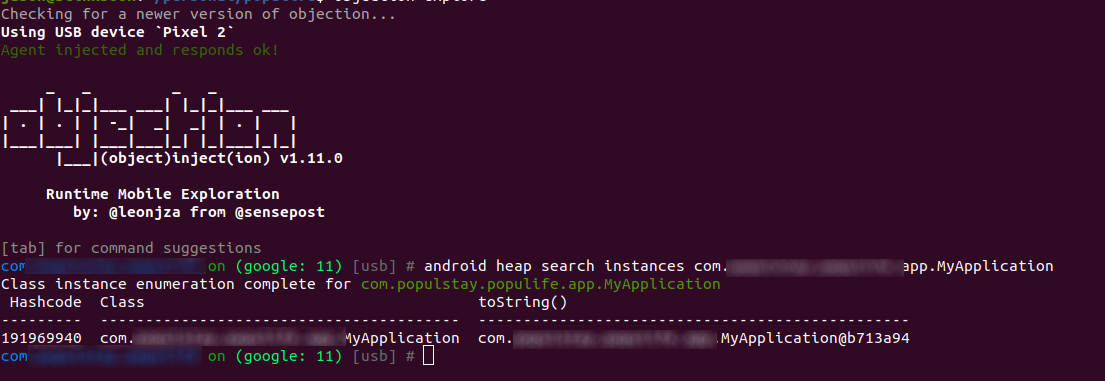
<p>I want to execute code against the main application class ( <code class="language-plaintext highlighter-rouge">MyApplication</code>) instance. In the Objection console I’ll first find the instance of the application</p>
<figure>
  <img src="/assets/debug-logging/find-class.png" alt="Objection console used to find an instance of MyApplication" />
</figure>

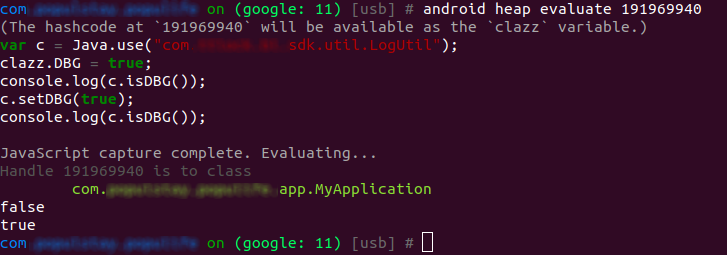
<p>Now I want to <code class="language-plaintext highlighter-rouge">evaluate</code> a script against the app instance to set <code class="language-plaintext highlighter-rouge">DBG</code> to true via the <code class="language-plaintext highlighter-rouge">setDBG</code> setter.
Here’s the frida script. The <code class="language-plaintext highlighter-rouge">clazz</code> var is built in Objection variable pointing to the object we’re running against.</p>

<figure class="highlight"><pre><code class="language-javascript" data-lang="javascript"><span class="kd">var</span> <span class="nx">c</span> <span class="o">=</span> <span class="nx">Java</span><span class="p">.</span><span class="nx">use</span><span class="p">(</span><span class="dl">"</span><span class="s2">com._._.sdk.util.LogUtil</span><span class="dl">"</span><span class="p">);</span>
<span class="nx">clazz</span><span class="p">.</span><span class="nx">DBG</span> <span class="o">=</span> <span class="kc">true</span><span class="p">;</span>
<span class="nx">console</span><span class="p">.</span><span class="nx">log</span><span class="p">(</span><span class="nx">c</span><span class="p">.</span><span class="nx">isDBG</span><span class="p">());</span>
<span class="nx">c</span><span class="p">.</span><span class="nx">setDBG</span><span class="p">(</span><span class="kc">true</span><span class="p">);</span>
<span class="nx">console</span><span class="p">.</span><span class="nx">log</span><span class="p">(</span><span class="nx">c</span><span class="p">.</span><span class="nx">isDBG</span><span class="p">());</span></code></pre></figure>

<p>And the interactie output:</p>
<figure>
  <img src="/assets/debug-logging/eval-js.png" alt="Objection console turning on debug logging via javascript" />
</figure>

<p>The <code class="language-plaintext highlighter-rouge">false,true</code> log lines make me <em>think</em> the script has run but we need to look at the logs to verify.</p>

<h2 id="verify-the-output">Verify the output</h2>
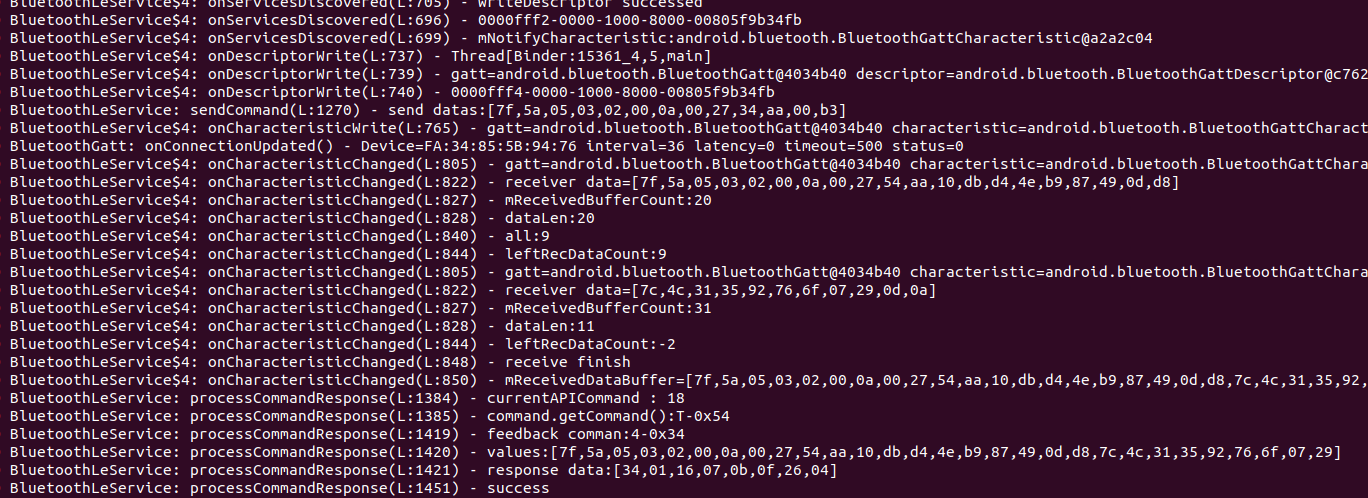
<p>Checking in on the logcat session shows us lines that look very similar to the examples above</p>

<figure>
  <img src="/assets/debug-logging/log-messages.png" alt="adb logcat debug output" />
</figure>

<p>Now that debug logging is on I can interact use the app to interact with the lock and have a record of all the operations like network calls and BLE transfers.</p>

<h2 id="conclusion">Conclusion</h2>
<p>Objection and Frida are incredible tools – I really don’t understand how they are free. And this use case barely
scratches the surface of what is possible with them. I look forward to exploring topics like hooking functions and disabling SSL pinning in future blog posts.</p>]]></content><author><name>Jason</name></author><category term="HOWTO" /><category term="objection" /><category term="frida" /><summary type="html"><![CDATA[Using Objection to enable debug mode on a running application.]]></summary></entry><entry><title type="html">eLinkSmart Fingerprint Padlock Cracked</title><link href="https://www.lockhacking.com//2022/05/24/elinksmart-padlock-cracked.html" rel="alternate" type="text/html" title="eLinkSmart Fingerprint Padlock Cracked" /><published>2022-05-24T00:00:00-04:00</published><updated>2022-05-24T00:00:00-04:00</updated><id>https://www.lockhacking.com//2022/05/24/elinksmart-padlock-cracked</id><content type="html" xml:base="https://www.lockhacking.com//2022/05/24/elinksmart-padlock-cracked.html"><![CDATA[<h2 id="introduction">Introduction</h2>

<p>The eLinkSmart Fingerprint Padlock is an inexpensive BLE padlock with fingerprint reader. The lock is marketed as good for a backpack, luggage, or a gym locker; the lock can be unlocked with a fingerprint or with the eLinkSmart app via Bluetooth Low Energy (BLE).</p>

<p>As far as I know there are no public attacks against this lock. In this post I’ll detail my attempt to open the lock over BLE.</p>

<figure style="width:200px;height:auto;" class="align-center">
  <img src="/assets/elinksmart-cracked/elinksmart-th.png" />
  <figcaption>eLinkSmart fingerprint reader via elinksmart.com</figcaption>
</figure>

<h2 id="attack">Attack</h2>
<p>This lock encrypts app communication to make eavesdropping and impersonation harder. The lock is also not vulerable to simple replay attacks.</p>

<p>Similar locks have been physically attacked by <a href="https://www.youtube.com/watch?v=k6ra0yPlY4k">Bosnian Bill with a screwdriver</a>, the <a href="https://www.youtube.com/watch?v=7Uje4pxfSlI">LockpickingLawyer with a screwdriver</a>,  or compromised via <a href="https://www.pentestpartners.com/security-blog/totally-pwning-the-tapplock-smart-lock/">poor API access control and replay attacks </a>.</p>

<p>Unfortunately recent versions of this lock use a hard-coded encryption key. If you have that encryption key you can easily read app communications and impersonate the app.</p>

<p>After recovering the encryption key I will compromise the lock by decrypting password material from a sniffed session and forge my own unlock packets.</p>

<h2 id="prerequisites">Prerequisites</h2>
<p>The unlock attack requires two pieces of information</p>

<dl>
  <dt>Encryption key</dt>
  <dd>The AES encryption key used to secure BLE communication</dd>
  <dt>Admin Password</dt>
  <dd>The short ascii admin password, which is dynamic and assigned when a lock is bound to the app.</dd>
</dl>

<p>The security of the lock relies entierly on these data remaining secret, but both are trivial to discover.</p>

<h3 id="encryption-key">Encryption key</h3>

<p>I found the AES encryption key by decompiling the Android client application. Investigating the app was made more diffcult since the code was obfuscated, but certain telltale strings (<em>SecretKeySepc</em>, <em>AES</em>) were easy enough to find.</p>

<p>A few minutes of exploring uncovered up the following functions:</p>

<figure class="highlight"><pre><code class="language-java" data-lang="java">  <span class="kd">public</span> <span class="kd">static</span> <span class="kt">byte</span><span class="o">[]</span> <span class="nf">c</span><span class="o">(</span><span class="nc">SecretKeySpec</span> <span class="n">paramSecretKeySpec</span><span class="o">,</span> <span class="kt">byte</span><span class="o">[]</span> <span class="n">paramArrayOfbyte</span><span class="o">)</span> <span class="kd">throws</span> <span class="nc">GeneralSecurityException</span> <span class="o">{</span>
    <span class="c1">// Cipher mode!</span>
    <span class="nc">Cipher</span> <span class="n">cipher</span> <span class="o">=</span> <span class="nc">Cipher</span><span class="o">.</span><span class="na">getInstance</span><span class="o">(</span><span class="s">"AES/ECB/PKCS5Padding"</span><span class="o">);</span>
    <span class="n">cipher</span><span class="o">.</span><span class="na">init</span><span class="o">(</span><span class="mi">1</span><span class="o">,</span> <span class="n">paramSecretKeySpec</span><span class="o">);</span>
    <span class="k">return</span> <span class="n">cipher</span><span class="o">.</span><span class="na">doFinal</span><span class="o">(</span><span class="n">paramArrayOfbyte</span><span class="o">);</span>
  <span class="o">}</span>
  <span class="c1">// [snip]</span>
  <span class="kd">private</span> <span class="kd">static</span> <span class="nc">SecretKeySpec</span> <span class="nf">e</span><span class="o">()</span> <span class="kd">throws</span> <span class="nc">UnsupportedEncodingException</span> <span class="o">{</span>
    <span class="c1">// uhoh -- key text removed for blog post</span>
    <span class="k">return</span> <span class="k">new</span> <span class="nf">SecretKeySpec</span><span class="o">(</span><span class="s">"..."</span><span class="o">.</span><span class="na">getBytes</span><span class="o">(</span><span class="s">"UTF-8"</span><span class="o">),</span> <span class="s">"AES"</span><span class="o">);</span>
  <span class="o">}</span></code></pre></figure>

<p>Function <code class="language-plaintext highlighter-rouge">c</code> does the encryption with the hardcoded key material in function <code class="language-plaintext highlighter-rouge">e</code>. Now I’ve got the encryption key as well as the cipher mode (<em>AES/ECB/PKCS5Padding</em>) required to decrypt traffic.</p>

<h3 id="admin-password-capture">Admin password capture</h3>

<p>The admin password is required to send an unlock command. The user does not choose their own password – it is dynamically set by the client app when first paired with a lock.</p>

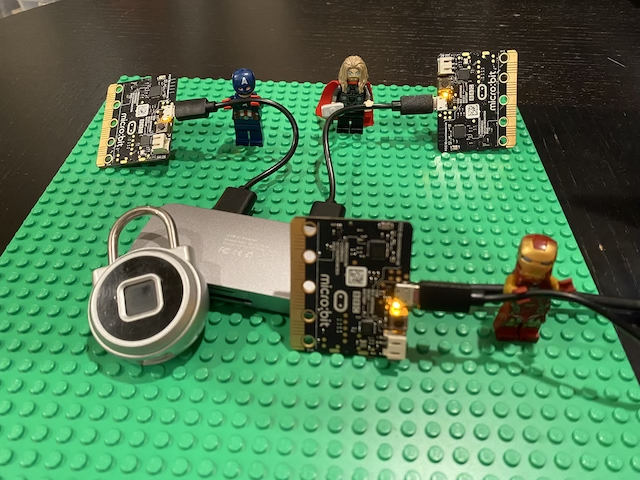
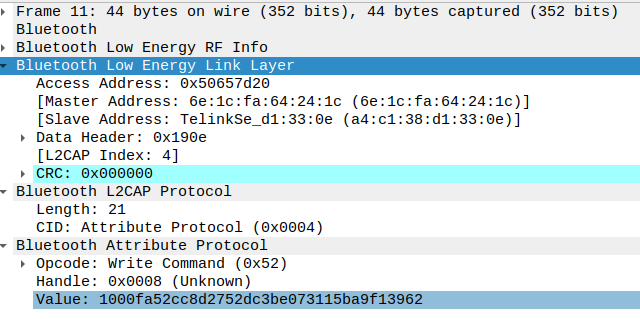
<p>I captured a few unlock actions with my bluetooth sniffing rig.</p>

<figure class="half">
  <a href="/assets/elinksmart-cracked/ble-sniffing-rig.png"><img src="/assets/elinksmart-cracked/ble-sniffing-rig-th.png" /></a>
  <a href="/assets/elinksmart-cracked/wireshark.png"><img src="/assets/elinksmart-cracked/wireshark-th.png" /></a>
  <figcaption>Sniffing rig</figcaption>
</figure>

<p>I use 3 <a href="https://microbit.org/">BBC micro:bits</a> running the absolutely fantastic <a href="https://github.com/virtualabs/btlejack">btlejack</a> to pull BLE data into <a href="https://www.wireshark.org/">wireshark</a>.</p>

<h3 id="admin-password-decode">Admin password decode</h3>

<p>After decrypting the captured data I isolated an 18 byte packet that is sent immediately before the lock opens.</p>

<div class="hexy"><div class="line"><span class="offset">0000:   </span><span class="bytes"><span class="underline blue">1000</span> <span class="underline red">1200</span> cd3d 88a9 ba69 0562 <span class="underline orange">3238 3434 </span></span></div><div class="line"><span class="offset">0010:   </span><span class="bytes"><span class="underline orange">3537 </span></span></div></div>
<p><br /></p>

<p>I was able to work backwards by searching the app code for the <span style="text-decoration: underline blue;">blue</span> and <span style="text-decoration: underline red;">red</span> byte groups as 16-bit little endian integers. Those values are 16 and 18; I’m assuming they’re  packet identifiers.</p>

<figure class="highlight"><pre><code class="language-java" data-lang="java">  <span class="kd">public</span> <span class="kd">static</span> <span class="kt">byte</span><span class="o">[]</span> <span class="nf">w</span><span class="o">(</span><span class="kt">int</span> <span class="n">paramInt</span><span class="o">,</span> <span class="nc">String</span> <span class="n">paramString</span><span class="o">)</span> <span class="o">{</span>
    <span class="kt">byte</span><span class="o">[]</span> <span class="n">arrayOfByte2</span> <span class="o">=</span> <span class="k">new</span> <span class="kt">byte</span><span class="o">[</span><span class="mi">18</span><span class="o">];</span>
    <span class="c1">// BLUE</span>
    <span class="nc">System</span><span class="o">.</span><span class="na">arraycopy</span><span class="o">(</span><span class="nc">Packet</span><span class="o">.</span><span class="na">shortToByteArray_Little</span><span class="o">((</span><span class="kt">short</span><span class="o">)</span><span class="mi">16</span><span class="o">),</span> <span class="mi">0</span><span class="o">,</span> <span class="n">arrayOfByte2</span><span class="o">,</span> <span class="mi">0</span><span class="o">,</span> <span class="mi">2</span><span class="o">);</span>
    <span class="c1">// RED</span>
    <span class="nc">System</span><span class="o">.</span><span class="na">arraycopy</span><span class="o">(</span><span class="nc">Packet</span><span class="o">.</span><span class="na">shortToByteArray_Little</span><span class="o">((</span><span class="kt">short</span><span class="o">)</span><span class="mi">18</span><span class="o">),</span> <span class="mi">0</span><span class="o">,</span> <span class="n">arrayOfByte2</span><span class="o">,</span> <span class="mi">2</span><span class="o">,</span> <span class="mi">2</span><span class="o">);</span>
    <span class="c1">// ORANGE</span>
    <span class="kt">byte</span><span class="o">[]</span> <span class="n">arrayOfByte1</span> <span class="o">=</span> <span class="n">paramString</span><span class="o">.</span><span class="na">getBytes</span><span class="o">();</span>
    <span class="nc">System</span><span class="o">.</span><span class="na">arraycopy</span><span class="o">(</span><span class="n">arrayOfByte1</span><span class="o">,</span> <span class="mi">0</span><span class="o">,</span> <span class="n">arrayOfByte2</span><span class="o">,</span> <span class="mi">12</span><span class="o">,</span> <span class="n">arrayOfByte1</span><span class="o">.</span><span class="na">length</span><span class="o">);</span>
    <span class="c1">// this is a very helpful log message</span>
    <span class="n">stringBuilder</span><span class="o">.</span><span class="na">append</span><span class="o">(</span><span class="s">"--packageUnlockCloudPwd-- bUlkCloudPwd:"</span><span class="o">);</span>
    <span class="k">return</span> <span class="nf">h</span><span class="o">(</span><span class="n">arrayOfByte2</span><span class="o">);</span>
  <span class="o">}</span></code></pre></figure>

<p>I ended up on the annoyingly named <code class="language-plaintext highlighter-rouge">w</code> function that constructs a login packet (above: edited of brevity and comments mine).
Using the helpful <code class="language-plaintext highlighter-rouge">bUlkCloudPwd</code> string I was able to search application logs and deteremine the last part of the package (<span style="text-decoration: underline orange">orange</span>) is the ASCII admin password I need to create my own unlock packet.</p>

<p>With that password and the encryption key I can forge my own packets.</p>

<h2 id="unattented-unlock">Unattented Unlock</h2>
<p>To perform an unattended unlock I needed to write some code to speak the unlock protocol. The unlock protocol looks more or less like this:</p>

<p>(<strong>login-request</strong>) <strong>App or Attacker</strong>: Hey friend, I’d like to talk with you. Here’s some magic numbers and a timestamp.</p>

<p>(<strong>login-response</strong>) <strong>Lock</strong>: Hi there! Here’s my battery level, lock name, firmware version, and a session key. Hold on to that last bit as I’ll ask you for it later!</p>

<p><em>…later…</em></p>

<p>(<strong>unlock-request</strong>) <strong>App or Attacker</strong>: me again! Here’s an unlock packet with my timestamp, that session key from earlier, and an admin password I got from secure memory (if I’m an app) or a LEGO guy (if I’m an attacker).</p>

<p>(<strong>unlock-response</strong>) <strong>Lock</strong>: This seems legit &lt;Whirr Brrr Click&gt;  I’m unlocked!</p>

<p>To perform the unlock attack I recreated parts of the protocol in Javascript. The packet coders and decoders, and the functions to send GATT data  are less than ~100 lines of Javascript.</p>

<p>TLDR:</p>
<video width="100%" controls="">
<source src="/assets/elinksmart-cracked/elinksmart-unlock.mp4" type="video/mp4" />
</video>

<p>Success! The lock has been unlocked. Best of all: the attempt doesn’t show up on the internal lock access logs.</p>

<h2 id="future-work">Future work</h2>
<p>I only worked on unlock - there are many more interesting pieces of this protocol to explore such as:</p>
<ul>
  <li>Factory reset</li>
  <li>Enrolling fingerprints</li>
  <li>Temporary and shared passwords</li>
</ul>

<p>I will return to at least the fingerprint enroll at some point in the future.</p>

<h2 id="vendor-contact">Vendor contact</h2>
<p>Repeated attempts to notify the vendor over email have gone unanswered, with first contact in Jan 2022 and latest in May 2022.</p>

<h2 id="mitigation-and-conclusion">Mitigation and conclusion</h2>
<p>This lock can be easily opened mechanically and digitally and should be avoided for anything other than research purposes in my opinion.</p>

<p>The manufacturer did a few things right like obfuscating the application code  and bothering to encrypt the communications. But they undermined their own security by hardcoding the encryption key and emitting copious log messages with easily greppable strings. The log messages were very helpful when trying to figure out what the obsfucated functions like <code class="language-plaintext highlighter-rouge">public void M()</code> actually does (<code class="language-plaintext highlighter-rouge">sendUnlockByPwd</code>).</p>

<p>The vendor hasn’t returned my emails, but if they did I’d suggest that they:</p>

<ul>
  <li>Switch to a more secure version of BLE pairing</li>
  <li>Stop using static encryption keys</li>
  <li>Really stop using AES in ECB mode (<a href="https://crypto.stackexchange.com/questions/20941/why-shouldnt-i-use-ecb-encryption">SO discussion</a>)</li>
  <li>Remove debug logging from production app builds</li>
</ul>

<p>I would not recommend this lock to secure your valuables. I would recommend this lock if you want to experiment with BLE lock cracking because it is inexpensive and has a huge and interesting attack surface. If you find anything interesting please reach out to me on <a href="https://twitter.com/offpol">Twitter</a> or <a href="mailto:holtjason@protonmail.com">email</a>.
Happy hacking.</p>]]></content><author><name>Jason</name></author><summary type="html"><![CDATA[I demonstrate a BLE unlock attack against the eLinkSmart fingerprint BLE lock.]]></summary></entry></feed>